Comment triggers
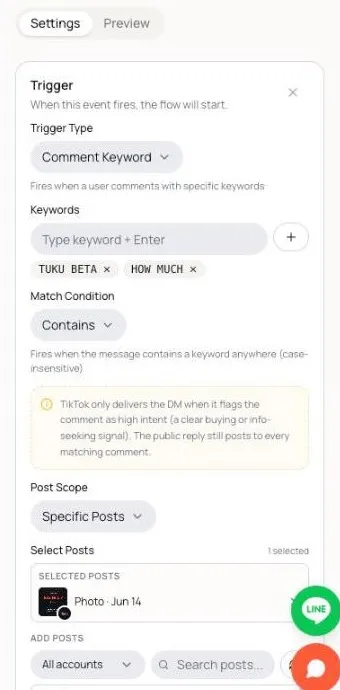
A trigger is the rule that decides when an automation starts. Every automation has exactly one trigger. You set it by clicking the Trigger step at the top of the flow in the editor.
Trigger types
Section titled “Trigger types”Pick one under Trigger Type:
| Type | When it fires |
|---|---|
| Comment Keyword | Someone comments on your post with one of your keywords (for example PRICE, ราคา, LINK). |
| DM Keyword | Someone sends your account a DM with one of your keywords. |
| Any Comment | Someone leaves any comment on the posts in scope. No keyword needed. |
Comment Keyword and DM Keyword need at least one keyword. Type a keyword and press Enter to add it. Match Condition decides where the keyword must appear: Contains, Exact match or Starts with. See Keywords that actually fire.
Post Scope (comment triggers)
Section titled “Post Scope (comment triggers)”Comment Keyword and Any Comment triggers have a Post Scope:
- All Posts: every post on every connected TikTok account. Good for evergreen rules like price.
- All Posts of One Account: every post on one account you pick under TikTok Account. This option appears only when your workspace has two or more connected accounts.
- Specific Posts: only the posts you pick. Good for a campaign, or for an Any Comment automation on one launch post.
With All Posts or All Posts of One Account, the editor shows a warning. That is a reminder that the automation runs on every post in that scope.
Picking specific posts
Section titled “Picking specific posts”With Specific Posts, a post picker appears:
- Search your posts with Search posts… and click a post to add it.
- Selected posts at the top shows exactly what will trigger. Remove a post there.
- With several connected accounts, the picker shows posts from all of them, each with its account’s picture. Use the account filter to narrow the list.
The account the trigger listens on comes from the posts you pick. If they are all from one account, it listens on that account. If they span accounts, it listens on each of them.
You can also start an automation from a post. Open the post in Posts and click Create automation. See Posts.
TikTok Account (DM triggers)
Section titled “TikTok Account (DM triggers)”A DM Keyword trigger has no posts. Instead, pick the account it listens on under TikTok Account:
- A single account. A new DM trigger starts on the account selected in the sidebar.
- All accounts: it listens for the keyword on every connected account.
If the chosen account is later disconnected, the editor shows This account is disconnected. Pick another account or reconnect it.
Comment actions
Section titled “Comment actions”Comment triggers have two optional switches under Comment actions:
- Like the comment: likes every comment that fires this automation. The commenter gets a notification.
- Hide the comment after replying: hides the comment so only the commenter still sees it. Tuku hides it after the flow runs, once its reply or DM has gone out.
Like the comment applies to every matching comment. A flow that only replies to the comment also runs for every matching comment. A flow that sends a DM runs only for comments TikTok flags as high intent (see below), and Tuku hides the comment only after the flow runs. So with a DM flow, a matching comment TikTok never flags stays visible, even with Hide the comment after replying on.
To post a public reply under the comment, add a Reply to comment step to the flow. If the flow only replies, the reply goes out on every matching comment. If the flow also sends a DM, the reply waits for high intent too.
Who actually gets a DM
Section titled “Who actually gets a DM”TikTok, not Tuku, decides which commenters can receive an automated DM. When someone comments, TikTok judges whether the comment shows real interest, like a buying or info-seeking question. TikTok calls this high intent. Only then does it let your account DM that person. The editor reminds you of this on comment triggers whose flow sends a DM: “This flow sends DMs, so all of it, including the comment reply, only runs when TikTok flags the comment as high intent (a clear buying or info-seeking signal). Other matching comments get no reply or DM; only “Like the comment” still applies.”
Because of this:
- Not every matching comment gets a DM. Two people can leave the same comment and only one becomes eligible. That is TikTok’s call.
- Tuku starts a flow that sends a DM when TikTok flags the comment as high intent. On the canvas, steps that depend on this show the badge Only fires on TikTok high-intent comments.
- A flow that only replies to the comment doesn’t wait for high intent. It runs on every matching comment, including on accounts outside Vietnam, Indonesia and Thailand.
- You can’t force a DM to a commenter TikTok did not flag. Invite them to message you instead. Once they send a DM, you can reply normally.
- Comment-to-DM only works for accounts registered in Vietnam, Indonesia or Thailand that are a Verified Business Account (VBA), or that have Advanced Access and ran TikTok Messaging Ads in the last 7 days. TikTok also only lets the account DM commenters whose own accounts are registered in Asia-Pacific, Latin America, or the Middle East, Turkey, Africa and Pakistan. See the connection checklist.
Also, until the commenter replies, TikTok delivers only one message from a comment. So the first step that sends something must be a text Send Message. Add a Wait for Reply before any second message. See DM flows.
Multiple TikTok accounts
Section titled “Multiple TikTok accounts”If your workspace has more than one connected account:
- All Posts comment triggers listen on every account.
- All Posts of One Account and Specific Posts listen only on the accounts you chose.
- DM Keyword triggers listen on the account you picked, or on All accounts.
On the Automations list, the Account column shows where each automation listens. The account filter lets you show one account’s automations. Automations that listen on all accounts appear under every account.
One automation at a time per person
Section titled “One automation at a time per person”Each person can be in only one automation at a time. If someone is already in the middle of a flow, a new matching comment does not start a second one. If they send a DM, it continues the flow they are in.
Only one automation runs per comment or DM. If two active automations share a keyword on overlapping posts, you can’t predict which one runs. Tuku warns you about this when you publish. See Overlapping keywords.
What stops a trigger from firing
Section titled “What stops a trigger from firing”- The comment is your own. See below.
- The comment was hidden by comment moderation. Hidden comments never trigger automations.
- The automation is paused or still a draft. Only Active automations run.
- The person is already in another automation.
- The flow sends a DM and TikTok did not flag the comment as high intent. The flow doesn’t run, so there is no reply or DM. Only Like the comment applies. A flow that only replies doesn’t wait for this.
- You reached your monthly active contacts limit and the commenter is a new contact.
- The TikTok connection needs attention. A DMs unavailable or Reconnect needed badge or banner appears. Open the connection checklist.
Your own comments don’t trigger
Section titled “Your own comments don’t trigger”When you comment on your own posts, for example to test, Tuku does not treat that comment as a lead. It won’t start a flow, create a contact, count toward your monthly active contacts, or DM you. This applies to every trigger type.
Your own comments still appear in the post’s comments. They are just skipped for automations.