Messaging limits
TikTok limits how many messages a business account can send in a chat, and for how long. These limits come from TikTok, not Tuku. They apply to every DM, whether an automation sends it or a teammate does.
Knowing them helps you build flows that don’t get cut off, and answer customers before the window closes.
The three windows
Section titled “The three windows”| Window | When it applies | What you can send |
|---|---|---|
| First window | The customer sends their first message. | Up to 10 messages in the next 48 hours. |
| Open window | The customer replies to you. | Unlimited messages for 48 hours after each reply. |
| Follow-ups only | More than 48 hours have passed since the customer’s last reply. | Up to 3 more messages, until the customer replies again. |
Every time the customer replies, the 48-hour clock starts again and the unlimited window opens.
When none of these apply (the 48 hours are over and the follow-ups are used up), the window is closed. You can’t send anything until the customer writes again.
How a chat moves through the windows
Section titled “How a chat moves through the windows”- The customer sends a first message. You can send up to 10 messages in the next 48 hours.
- The customer replies. A new 48-hour window opens. Send as many messages as you need.
- The customer goes quiet for more than 48 hours. You can send 3 more messages. Use them to remind, not to spam.
- The customer replies again. The unlimited window opens for another 48 hours.
This repeats for as long as you talk to the customer.
What you see in the inbox
Section titled “What you see in the inbox”The inbox shows where each chat stands, so you don’t have to count.
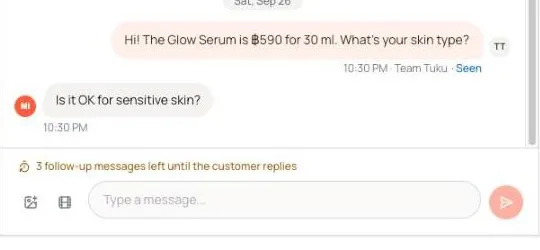
Above the reply box
| Message | When you see it |
|---|---|
| 5h 12m left to reply (for example) | Less than 24 hours are left in the window. It turns amber when less than 6 hours are left. |
| 2 follow-up messages left until the customer replies (for example) | The 48 hours have passed. You are in follow-ups only. |
| 3 messages left in this window (for example) | You have 3 or fewer of the 10 messages left in the first window. |
| The reply window is closed. You can reply once the customer messages again. | The window is closed. The reply box is hidden. |
| You can reply once the customer sends their first message. | The customer hasn’t written in this chat yet. |
In the conversation list
- 3h left (for example): time left in the window. It shows when less than 6 hours are left, or when the customer is waiting and less than 24 hours are left.
- 2 follow-ups left (for example): the customer is waiting and you are in follow-ups only.
- Missed: the customer wrote, but the window closed before anyone answered.
Tabs and filters
- The Expiring tab lists chats whose window closes within the next 6 hours, soonest first. Check it a few times a day.
- In the Filter menu, Reply window lets you show only chats that are Open, Follow-ups only or Closed.
What this means for your flows
Section titled “What this means for your flows”- Keep the first flow under 10 messages. A comment or keyword flow usually starts right after the customer’s first message. If it sends more than 10 DMs before the customer replies, TikTok stops it.
- Ask a question early. A customer reply is the fastest way to open the unlimited window. A button or a question near the top of your flow helps.
- Don’t send many follow-ups to a quiet customer. After 48 hours of silence you have only 3 messages. Space them out and make each one count.
What this means for your team
Section titled “What this means for your team”The same windows apply to replies your team sends from the inbox. Answer quickly, especially chats handed off by an automation.
See also Shared inbox → Reply to a customer.